
Radio button group element
Allows users to choose one item from a list of possible options.
| Type | radio_buttons |
| Available in | Messages, Modals, Home tab |
| Works in blocks | Section block, Actions block, Input block |
Choosing an option sends your app a block_actions payload with the option, copied from your element:
{ "type": "radio_buttons", "action_id": "contact_preference", "block_id": "contact_pref_northwind", "selected_option": { "text": { "type": "plain_text", "text": "Email" }, "value": "email" }, "action_ts": "1793786400.000000"}Only options your element offers can be sent. See the button element for the rest of the payload.
The current value is also reported in state.values[block_id][action_id] (as { "type": …, <value field> }) of every later interaction with the same message or view.
Inside an input block, changing the value sends nothing on its own: your app reads it from view.state.values in the view_submission payload. Set dispatch_action: true on the input block to also receive a block_actions payload on every change.
Fields
Section titled “Fields”| Field | Type | Description | Required? |
|---|---|---|---|
type |
String | The type of element. In this case type is always radio_buttons. |
Required |
action_id |
String | An identifier for the action triggered when the radio button group is changed. You can use this when you receive an interaction payload to identify the source of the action. Should be unique among all other action_ids in the containing block. Maximum length is 255 characters. If you leave it out, Repzo generates one. |
Optional |
options |
Array of Option object | An array of option objects. A maximum of 10 options are allowed. | Required |
initial_option |
Option object | An option object that exactly matches one of the options within options. This option will be selected when the radio button group initially loads. |
Optional |
confirm |
Confirmation dialog object | A confirm object that defines an optional confirmation dialog that appears after clicking one of the radio buttons in this element. If the reader cancels, nothing is sent to your app. | Optional |
focus_on_load |
Boolean | Indicates whether the element will be set to auto focus within the view. Only one element can be set to true. Defaults to false. |
Optional |
Examples
Section titled “Examples”Radio buttons in a section
Section titled “Radio buttons in a section”
{ "blocks": [ { "type": "section", "block_id": "contact_pref_northwind", "text": { "type": "mrkdwn", "text": "How does *Northwind Traders* prefer to receive invoices?" }, "accessory": { "type": "radio_buttons", "action_id": "contact_preference", "initial_option": { "text": { "type": "plain_text", "text": "Email" }, "value": "email" }, "options": [ { "text": { "type": "plain_text", "text": "Email" }, "value": "email" }, { "text": { "type": "plain_text", "text": "Customer portal" }, "value": "portal" }, { "text": { "type": "plain_text", "text": "Post" }, "value": "post", "description": { "type": "plain_text", "text": "Printed and mailed every Friday" } } ] } } ]}Radio buttons in a form
Section titled “Radio buttons in a form”This example belongs in a modal view — the screenshot shows it in a modal.
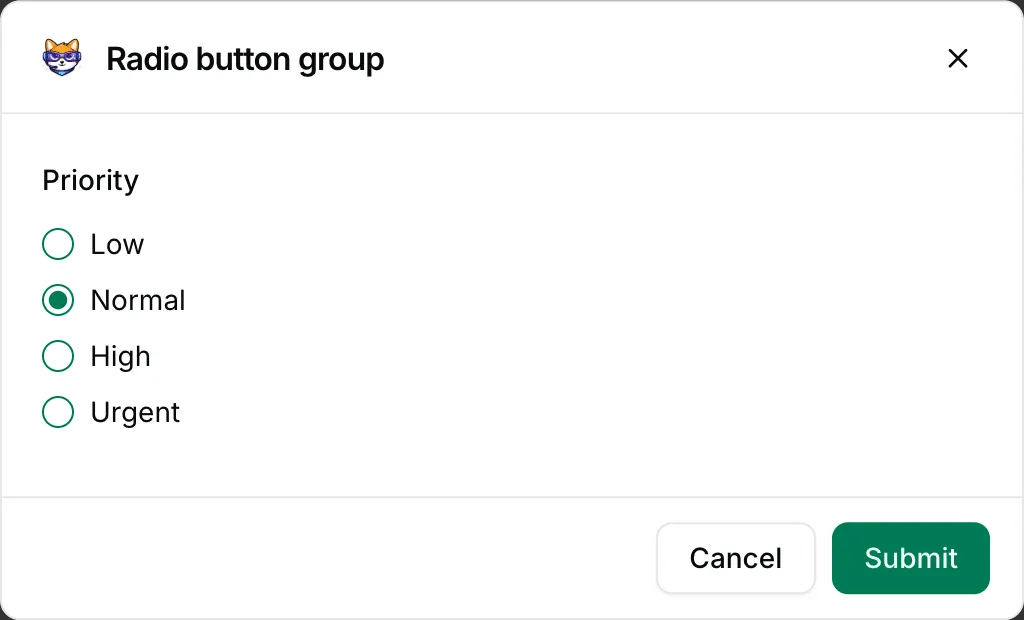
{ "blocks": [ { "type": "input", "block_id": "ticket_priority", "label": { "type": "plain_text", "text": "Priority" }, "element": { "type": "radio_buttons", "action_id": "priority", "initial_option": { "text": { "type": "plain_text", "text": "Normal" }, "value": "normal" }, "options": [ { "text": { "type": "plain_text", "text": "Low" }, "value": "low" }, { "text": { "type": "plain_text", "text": "Normal" }, "value": "normal" }, { "text": { "type": "plain_text", "text": "High" }, "value": "high" }, { "text": { "type": "plain_text", "text": "Urgent" }, "value": "urgent" } ] } } ]}