
Data table block
Displays a rich table readers can sort, filter and page through, with optional buttons in cells.
| Type | data_table |
| Available in | Messages, Modals, Home tab |
| Compatible block elements | Button element |
The first row is the header. Each cell is one of:
raw_text—{ "type": "raw_text", "text": "Open" }raw_number—{ "type": "raw_number", "value": 1250, "text": "1,250" };textis what readers see,valueis what sorting usesrich_text— a rich text block; not allowed in the header rowaction_cell—{ "type": "action_cell", "element": <button>, "fallback": <raw_text or raw_number cell> }. Set the button’svalueto identify the row, and give each button its ownaction_id.
A table has 1 to 20 columns and 2 to 201 rows (the header plus up to 200 rows); every row has the same number of cells. Clicking a column heading sorts it — numerically when every cell in the column is raw_number, alphabetically otherwise.
Fields
Section titled “Fields”| Field | Type | Description | Required? |
|---|---|---|---|
type |
String | The type of block. For a data table block, type is always data_table. |
Required |
rows |
Object[] | An array of rows, each an array of cells. The first row is the header. | Required |
block_id |
String | A unique identifier for the block. If not specified, one is generated. Use it to tell which block a block_actions payload came from. Maximum length is 255 characters. It must be unique within the message or view — a duplicate is replaced and reported as a warning. |
Optional |
page_size |
Integer | Rows per page. Minimum 1, maximum 100. Defaults to 5. | Optional |
caption |
String | A caption for the table, shown above it and read by screen readers. | Optional |
row_header_column_index |
Integer | The 0-based index of the column that identifies each row, for screen readers. Defaults to 0. | Optional |
Examples
Section titled “Examples”Overdue invoices with a button per row
Section titled “Overdue invoices with a button per row”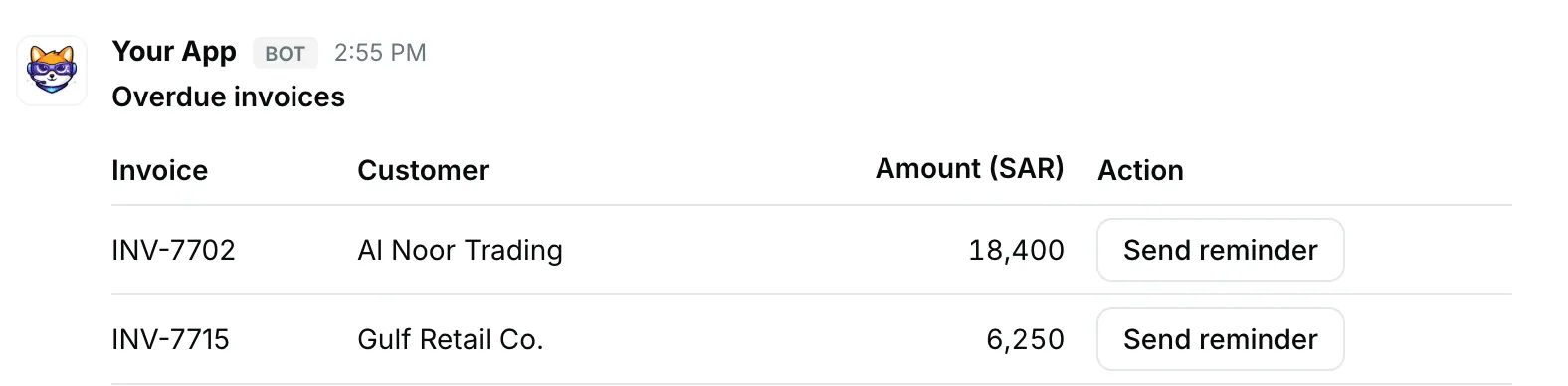
{ "blocks": [ { "type": "data_table", "caption": "Overdue invoices", "page_size": 5, "rows": [ [ { "type": "raw_text", "text": "Invoice" }, { "type": "raw_text", "text": "Customer" }, { "type": "raw_text", "text": "Amount (SAR)" }, { "type": "raw_text", "text": "Action" } ], [ { "type": "raw_text", "text": "INV-7702" }, { "type": "raw_text", "text": "Al Noor Trading" }, { "type": "raw_number", "value": 18400, "text": "18,400" }, { "type": "action_cell", "element": { "type": "button", "action_id": "remind_INV-7702", "text": { "type": "plain_text", "text": "Send reminder" }, "value": "INV-7702" }, "fallback": { "type": "raw_text", "text": "Overdue" } } ], [ { "type": "raw_text", "text": "INV-7715" }, { "type": "raw_text", "text": "Gulf Retail Co." }, { "type": "raw_number", "value": 6250, "text": "6,250" }, { "type": "action_cell", "element": { "type": "button", "action_id": "remind_INV-7715", "text": { "type": "plain_text", "text": "Send reminder" }, "value": "INV-7715" }, "fallback": { "type": "raw_text", "text": "Overdue" } } ] ] } ]}Rich text cells
Section titled “Rich text cells”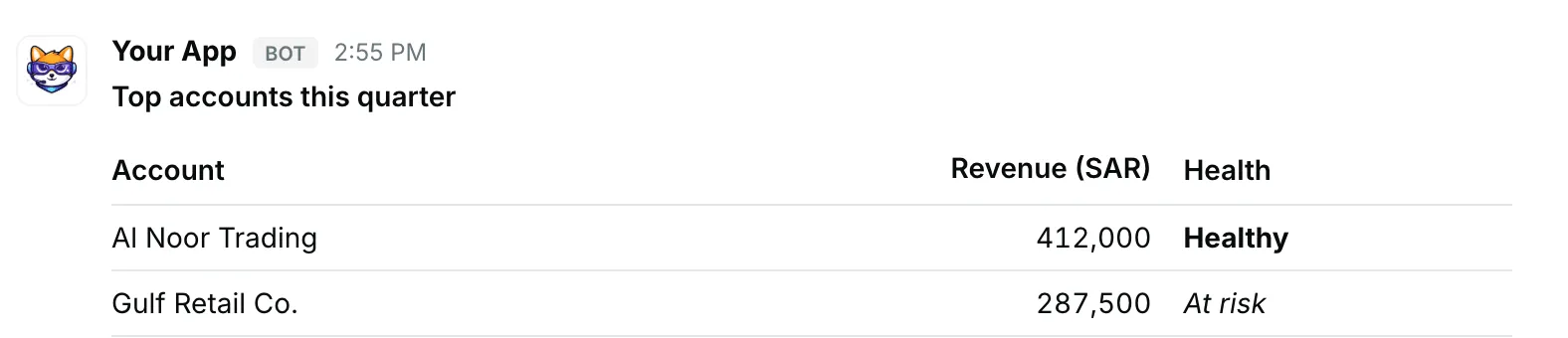
{ "blocks": [ { "type": "data_table", "caption": "Top accounts this quarter", "rows": [ [ { "type": "raw_text", "text": "Account" }, { "type": "raw_text", "text": "Revenue (SAR)" }, { "type": "raw_text", "text": "Health" } ], [ { "type": "raw_text", "text": "Al Noor Trading" }, { "type": "raw_number", "value": 412000, "text": "412,000" }, { "type": "rich_text", "elements": [ { "type": "rich_text_section", "elements": [ { "type": "text", "text": "Healthy", "style": { "bold": true } } ] } ] } ], [ { "type": "raw_text", "text": "Gulf Retail Co." }, { "type": "raw_number", "value": 287500, "text": "287,500" }, { "type": "rich_text", "elements": [ { "type": "rich_text_section", "elements": [ { "type": "text", "text": "At risk", "style": { "italic": true } } ] } ] } ] ] } ]}