
Number input element
Allows user to enter a number into a single-line field.
| Type | number_input |
| Available in | Modals, Home tab |
| Works in blocks | Input block |
Use the number input inside an input block, in a modal or the Home tab. The value isn’t sent as it’s typed: when the person submits the modal, your app receives it in the view_submission payload under view.state.values[block_id][action_id]:
{ "discount": { "discount_percent": { "type": "number_input", "value": "12.5" } } }Before calling your app, Repzo checks that required inputs (input blocks without optional: true) are filled in, that the value is a number (“Enter a number.”), that it is a whole number when is_decimal_allowed is false (“Enter a whole number.”) and that it is within min_value and max_value (“Must be at least 0.”, “Must be 30 or less.”). Problems are shown under the field and your app isn’t called.
With dispatch_action: true on the input block, the element also sends a block_actions payload with the same value when the person presses Enter, or as they type, depending on dispatch_action_config.
The value is always sent as a string, as on Slack. The number input accepts whole and decimal numbers, for example 0.25, 5.5 and -10; decimals only when is_decimal_allowed is true.
Fields
Section titled “Fields”| Field | Type | Description | Required? |
|---|---|---|---|
type |
String | The type of element. In this case type is always number_input. |
Required |
is_decimal_allowed |
Boolean | Decimal numbers are allowed if is_decimal_allowed is true; set the value to false otherwise. |
Required |
action_id |
String | An identifier for the input value when the parent view is submitted. You can use this when you receive a view_submission payload to identify the value of the input element (view.state.values[block_id][action_id]). Should be unique among all other action_ids in the containing block. Maximum length is 255 characters. If you leave it out, Repzo generates one. |
Optional |
initial_value |
String | The initial value in the number input when it is loaded. | Optional |
min_value |
String | The minimum value, cannot be greater than max_value. |
Optional |
max_value |
String | The maximum value, cannot be less than min_value. |
Optional |
dispatch_action_config |
Dispatch action configuration object | A dispatch configuration object that determines when during text input the element returns a block_actions payload. Only used when the parent input block sets dispatch_action: true. Defaults to on_enter_pressed. |
Optional |
focus_on_load |
Boolean | Indicates whether the element will be set to auto focus within the view. Only one element can be set to true. Defaults to false. |
Optional |
placeholder |
Text object | A plain_text only text object that defines the placeholder text shown in the number input. Maximum length for the text in this field is 150 characters. |
Optional |
Examples
Section titled “Examples”Number inputs in a form
Section titled “Number inputs in a form”This example belongs in a modal view — the screenshot shows it in a modal.
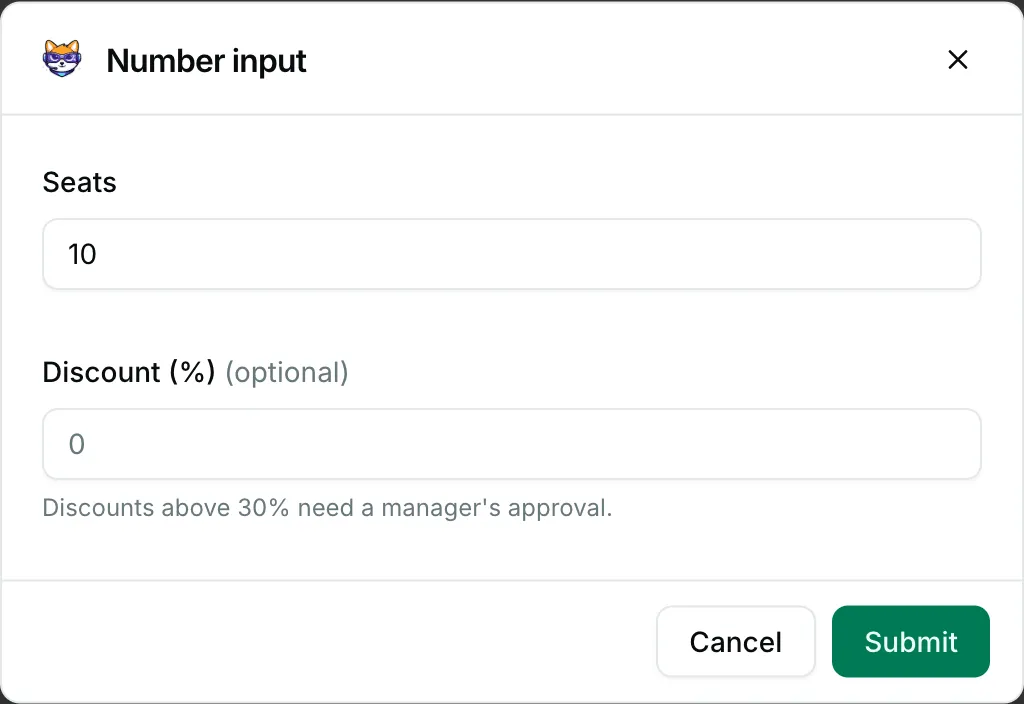
{ "blocks": [ { "type": "input", "block_id": "seats", "label": { "type": "plain_text", "text": "Seats" }, "element": { "type": "number_input", "action_id": "seat_count", "is_decimal_allowed": false, "initial_value": "10", "min_value": "1", "max_value": "500" } }, { "type": "input", "block_id": "discount", "optional": true, "label": { "type": "plain_text", "text": "Discount (%)" }, "element": { "type": "number_input", "action_id": "discount_percent", "is_decimal_allowed": true, "min_value": "0", "max_value": "30", "placeholder": { "type": "plain_text", "text": "0" } }, "hint": { "type": "plain_text", "text": "Discounts above 30% need a manager's approval." } } ]}