
Section block
Displays text, possibly alongside block elements. A section can be used as a text block, in combination with text fields, or side-by-side with certain block elements.
| Type | section |
| Available in | Messages, Modals, Home tab |
| Compatible block elements | Button element, Checkboxes element, Date picker element, Datetime picker element, Image element, Multi-select menu element, Overflow menu element, Radio button group element, Select menu element, Time picker element, Workflow button element |
Fields
Section titled “Fields”| Field | Type | Description | Required? |
|---|---|---|---|
type |
String | The type of block. For a section block, type is always section. |
Required |
text |
Text object | The text for the block, in the form of a text object. Minimum length for the text in this field is 1 and maximum length is 3000 characters. |
Required if no fields are provided |
block_id |
String | A unique identifier for the block. If not specified, one is generated. Use it to tell which block a block_actions payload came from. Maximum length is 255 characters. It must be unique within the message or view — a duplicate is replaced and reported as a warning. |
Optional |
fields |
Array of Text object | An array of text objects shown in two columns (one column on narrow screens). Maximum number of items is 10. Maximum length for the text in each item is 2000 characters. |
Required if no text is provided |
accessory |
Object | One of the compatible element objects. Shown beside the text (below it on phones). | Optional |
Examples
Section titled “Examples”A section with text
Section titled “A section with text”
{ "blocks": [ { "type": "section", "text": { "type": "mrkdwn", "text": "Quote *Q-2291* was *approved* and sent to the customer." } } ]}A section with text and fields
Section titled “A section with text and fields”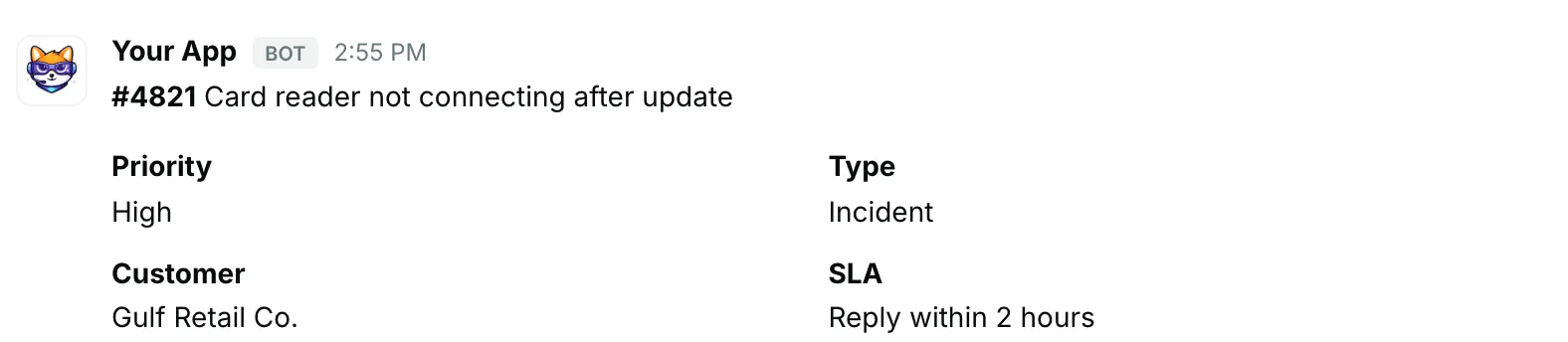
{ "blocks": [ { "type": "section", "text": { "type": "mrkdwn", "text": "*#4821* Card reader not connecting after update" }, "fields": [ { "type": "mrkdwn", "text": "*Priority*\nHigh" }, { "type": "mrkdwn", "text": "*Type*\nIncident" }, { "type": "mrkdwn", "text": "*Customer*\nGulf Retail Co." }, { "type": "mrkdwn", "text": "*SLA*\nReply within 2 hours" } ] } ]}A section with a date picker
Section titled “A section with a date picker”
{ "blocks": [ { "type": "section", "text": { "type": "mrkdwn", "text": "Pick a follow-up date for *Northwind — 40 POS terminals*." }, "accessory": { "type": "datepicker", "action_id": "follow_up_date", "initial_date": "2026-10-20", "placeholder": { "type": "plain_text", "text": "Select a date" } } } ]}