
Datetime picker element
Allows users to select both a date and a time of day.
| Type | datetimepicker |
| Available in | Messages, Modals, Home tab |
| Works in blocks | Section block, Actions block, Input block |
The reader picks a date and a time in their own time zone. Once both are set, your app receives a block_actions payload with the moment as selected_date_time, a UNIX timestamp in seconds:
{ "type": "datetimepicker", "action_id": "demo_time", "block_id": "demo_northwind", "selected_date_time": 1793786400, "action_ts": "1793786400.000000"}See the button element for the rest of the payload.
The current value is also reported in state.values[block_id][action_id] (as { "type": …, <value field> }) of every later interaction with the same message or view.
Inside an input block, changing the value sends nothing on its own: your app reads it from view.state.values in the view_submission payload. Set dispatch_action: true on the input block to also receive a block_actions payload on every change.
Fields
Section titled “Fields”| Field | Type | Description | Required? |
|---|---|---|---|
type |
String | The type of element. In this case type is always datetimepicker. |
Required |
action_id |
String | An identifier for the action triggered when a date and time are selected. You can use this when you receive an interaction payload to identify the source of the action. Should be unique among all other action_ids in the containing block. Maximum length is 255 characters. If you leave it out, Repzo generates one. |
Optional |
initial_date_time |
Integer | The initial date and time that is selected when the element is loaded, represented as a UNIX timestamp in seconds. This should be in the format of 10 digits, for example 1793786400 represents 4 November 2026 at 10:00 UTC. |
Optional |
confirm |
Confirmation dialog object | A confirm object that defines an optional confirmation dialog that appears after a date and time are selected. If the reader cancels, nothing is sent to your app. | Optional |
focus_on_load |
Boolean | Indicates whether the element will be set to auto focus within the view. Only one element can be set to true. Defaults to false. |
Optional |
Examples
Section titled “Examples”A datetime picker in an actions block
Section titled “A datetime picker in an actions block”
{ "blocks": [ { "type": "section", "text": { "type": "mrkdwn", "text": "*Northwind Traders* asked for a product demo. Pick a slot and I'll send the invite." } }, { "type": "actions", "block_id": "demo_northwind", "elements": [ { "type": "datetimepicker", "action_id": "demo_time", "initial_date_time": 1793786400 } ] } ]}A datetime picker in a form
Section titled “A datetime picker in a form”This example belongs in a modal view — the screenshot shows it in a modal.
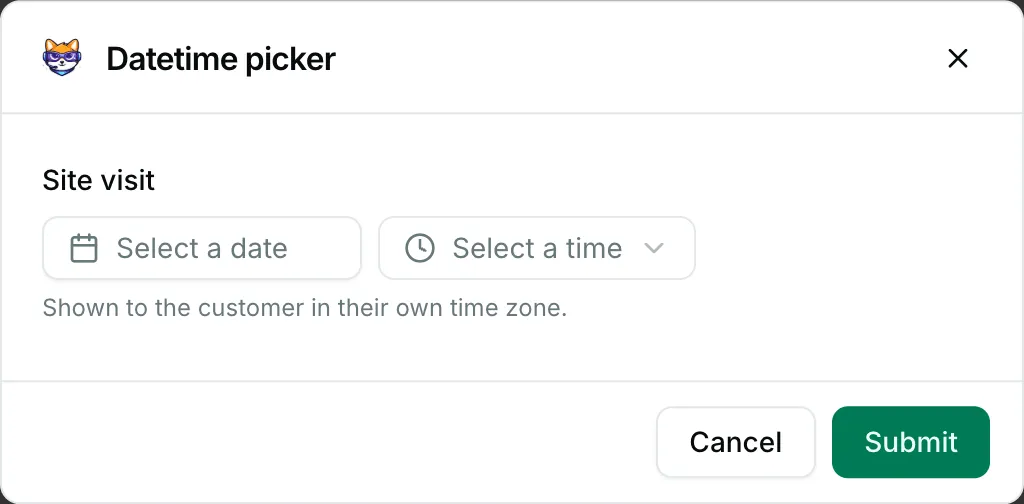
{ "blocks": [ { "type": "input", "block_id": "site_visit", "label": { "type": "plain_text", "text": "Site visit" }, "element": { "type": "datetimepicker", "action_id": "visit_at" }, "hint": { "type": "plain_text", "text": "Shown to the customer in their own time zone." } } ]}